See the shape of your JSON.
Paste any JSON and get a graph you can search, collapse and export. Nothing to install, no account needed.
Everything you need to read a payload you didn't write.
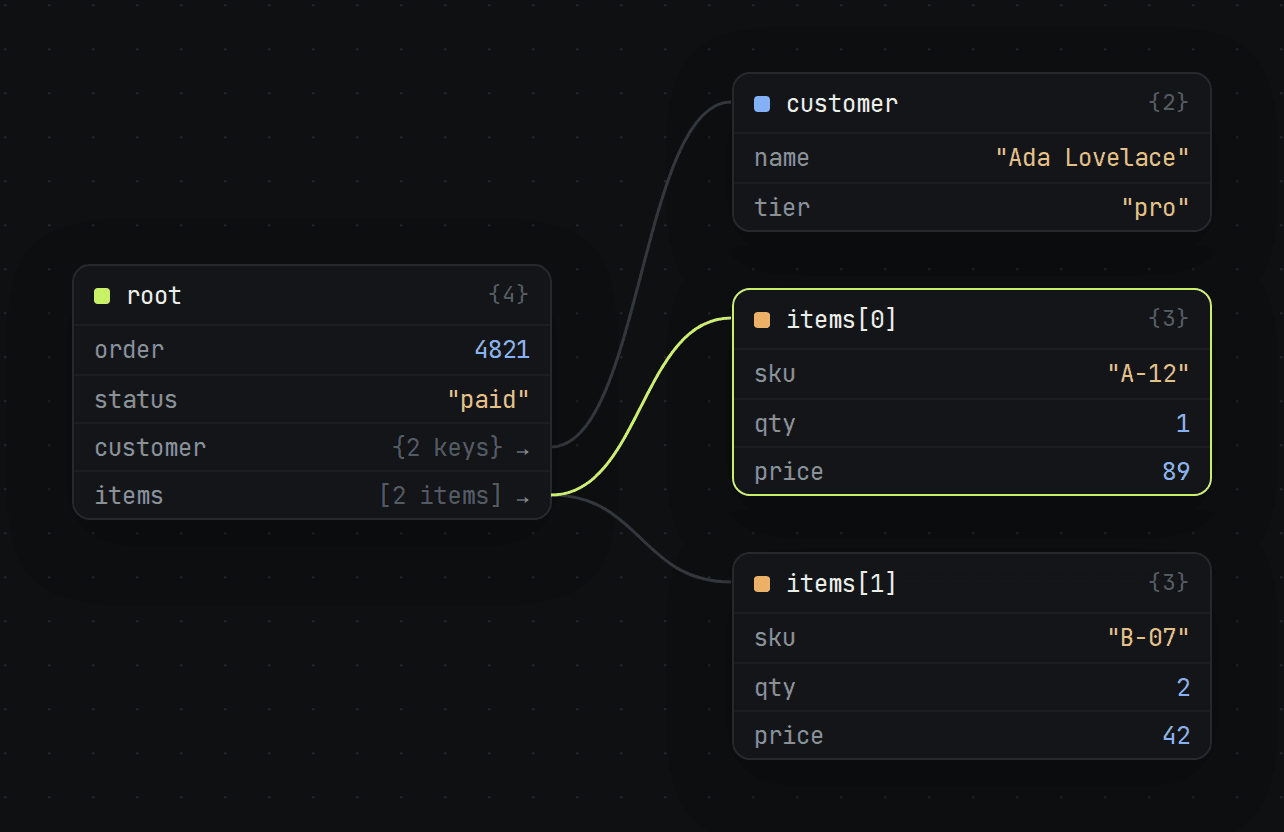
Objects become nodes
Every object and array is a node, laid out automatically, left to right or top to bottom. Drag them anywhere.
Graph, tree or 3D
Switch between a node graph, a foldable outline and a 3D model of the same file, without losing your place.
Find any key or value
Type a term and matches light up in whichever view you're in, while everything else fades.
Click a node, find its code
Select anything and its lines are highlighted in the editor, which scrolls to them. Syntax errors are flagged as you type.
Save it as an image
Export the whole graph as PNG, JPG or true vector SVG, in a fraction of a second, for docs, tickets and slides.
Copy any path or value
Select a node to see where it lives and what's in it, then copy its path, a code accessor or the value in one click.
Three ways to look at the same file.
Four steps, about ten seconds.
- 01Paste or drop a fileInto the editor, or drag a .json file onto the page.
- 02Read the graphThe structure appears beside your text, colour-coded by type.
- 03Dig inFold branches, search, switch views, and click a node to find it in the code.
- 04Take it with youDownload the JSON or export the graph as an image.
Free to use, with nothing to sign up for.
Every feature, no plans
All three views, search, sharing and image export. Nothing is held back for a paid tier.
Nothing is uploaded
Your JSON is read and drawn in your browser. Even share links keep the data in the link itself.
No account
Open the editor and start. The code is MIT licensed and on GitHub.
Made by one person, free for everyone.
If Visual Flow saves you time, a small contribution helps keep it maintained and free of ads.